Showing posts with label Moto. Show all posts

Monday, November 13, 2017

Motorola Moto E Now available with amazing specs|stock rom go to rompure.com

Motorola's a worth buying smartphone is now online . After a release of moto g , Motorola had made a huge name in the android market and smartphone markets . Motorola launched moto e a very affordable smartphone that is very worth buying . Moto e is now available on flipkart with a price range of 6999/- rs . Previously we said that it will be available in 7500 rs but now luckily , it is available in 6999/- rs and with a bunch of awesome features .


For now Moto E is available of black and white color on flipkart.com and it will be ready to be sold on flipkart only on this midnight . Stock will be over in 1-2 hours as there is a hug demand of this product .

Here is a video that Motorola launched on YouTube for promotion of Moto e -


Here are all the specs of Moto E that makes it a worth buying Smartphone of rupees 6999/-

Screen - Motorola Moto E comes with a dazziling display of 4.3 inch with a sharp , scratch-resistant display and with a water-resistant splash guard . That will protect the interior from water damage . Motorola Moto e has qhd display with 960 by 540 pixel resolution  and with a corning gorilla glass . It has a 256 ppi resolution It also has an anti-smudge coating that makes it perfect for everyday use .

Battery - Motorola Moto E non removable 1980 mAh battery , that will last long till a whole day . You can use it a whole day with a high usage and will last 3-4 days with a very low usage .

Android - Motorola Moto E will come with latest android version of android kitkat out of the box . Android kitkat is most latest android version and most smoothest android version . Motorola has also confirmed to give regular updates to device .

Processor - Moto E will come with a dual core qualcomm Snapdragon 200 A7 processor that is clocked at 1.2 ghz and is supported by 1 gb of ram and is very good for doing multitasking and handling high end games . It will provide a smooth gameplay and smooth interface to moto e .This device also has andreno  302 400 mhz single core graphics card for high end graphics games .

Camera - Moto e has a 5 megapixel of rear camera that is capable of taking hd videos and but it lacks front camera because low prices , Motorola has not made the front camera for the device . 

Other - Moto E has dual sim , it is capable of running two networks at the same time . Moto e comes with 4gb internal memory and with extended memory card upto 32 gb . It has all the features that an most of the smartphones lacks . 

Last words - Moto e is a worth buying smartphone , with a two huge companies behind it : Google and Motorola . 

Thursday, November 9, 2017

How to Root Moto X Play | Full Step by Step Guide|stock rom go to rompure.com

Rooting a phone is a process which allows a user to dive deeper into a phone's sub-system. It allows us access of the entire operating system and let us customize anything the way we like.


How to Root Moto X Play


Before rooting a phone, you should kept in mind that it violates your phone warranty. And if something not done properly, it could cause serious damage to your phone. 


# Before we start

Before following the steps below, you should know that you would have to unlock the bootloader of the phone and also flash a recovery (say, TWRP). To do this, you can click the link below to see the posts showing the process to do these.

How to Unlock Bootloader of Moto X Play

[Recovery] How to Flash TWRP 2.8.7.0 for Moto X Play | Complete Installation Guide

Now, we are going to show you the Step by Step full Guide to show how to root Moto X Play. 

Step 1. Download the SuperSU apk from the link in the bottom of the page or by clicking here.
Step 2. Place it into your phone's internal memory.
Step 3. Turn off your phone. Now boot it into recovery mode by pressing and  holding Volume down button and power key for 5 seconds and then release it.
Step 4. Your phone will boot into recovery mode now. Click Install and swipe down to the SuperSU apk. Select it and 'swipe right to confirm flash'.
Step 5. Now wait until installation is finished.
Step 6. Now select Reboot -> System. (Note - Select No if asked for fixing SuperSU)
Step 7. You are done. You have successfully rooted your Moto X Play.

Downloads

SuperSU apk - Download Here.

#See Also 

Wednesday, November 8, 2017

How to Unlock Bootloader of Moto X Play |stock rom go to rompure.com

Motorola has launched many new smartphones past month. One of them is Motorola Moto X Play. This phone is pre-loaded with great specifications and features that makes this phone special. With it, you can do so many things. But there are some limitations which cannot be crossed until the phone is rooted. And to root a phone, first of all you have to unlock Bootloader.

How to Unlock Bootloader of Moto X Play


Motorola Moto X Play comes with 5.5 inch display with 1080 x 1920 pixel resolution. Processor is Quad-core 1.7 GHz Cortex-A53 & Quad-core 1.0 GHz Cortex-A53It has 2 GB of RAM and 16/32 GB internal memory (two different variants). With 21 MP rear and 5 MP front camera, it takes awesome photos. It comes with 3630 mAh battery.

You need to unlock Bootloader for many purposes like rooting your phone, installing different ROMs, installing CyanogenMod, etc.

Here's a Step by Step Guide on How to Unlock Bootloader of Moto X Play. Just follow the steps shown below :

1. Install latest Motorola USB driver (if not automatically installed) and Minimal adb and Fastboot.
2. Take backup of your data because unlocking bootloader will erase the data.

3. Now go to Settings -> Developer Settings, and Select "Allow OEM Unlock".
4. Turn Off your Device.
5. Then turn The device On by holding Volume down button and power key for 5 seconds and release it. This will take you to Fastboot mode as shown in image below.


6. Now open Command Prompt by holding Shift and right clicking the blank space (white space) and press open command window here.


7. Now Connect your Phone to PC via USB Cable.
8. Type this in the CMD prompt window - fastboot oem get_unlock_data


9. Now you will see some code appearing on screen. These are code strings. Copy it by Right click -> Mark, and mark the text by pressing the Shift Key. Now press Ctrl+C to copy it. An example have been shown in the image below.


10. Paste all the lines in notepad and remove all the spaces between them. 
11. Now go to the Motorola WebSite and sign in using your Google account or Motorola ID. Scroll down the page and paste the string copied in Step 9.
12. Click on 'Can my device be Unlocked'.


13. If the device can be unlocked, then a 'Request Unlock Key' button will appear at the bottom of the page.
14. Click on 'I Agree' button and you will receive an E-mail with the Unlock Key at the email address you used to login.


15. Now copy the 20-character code. Make sure our device is connected.
16. Now go back to cmd and type in the following code - fastboot oem unlock YOUR_UNIQUE_KEY
17. You are Done. You have unlocked your Moto X Play Bootloader.

Tuesday, November 7, 2017

[Recovery] How to Flash TWRP 2.8.7.0 for Moto X Play | Complete Installation Guide|stock rom go to rompure.com

Team Win Recovery Project 2.x is a custom recovery built with ease of use and customization in mind. Its a fully touch driven user interface with no more volume or power buttons to mash. The GUI is also fully XML driven and completely theme-able. You can change just about every aspect of the look and feel. 


TWRP is necessary for many purposes like installing different ROMs, CM, taking backup and restoring the same, etc. You can download it from the link below.


#Before we start

Flashing recovery requires bootloader to be unlocked. For this, see our post How to Unlock Bootloader of Moto X Play.
Note : We are not responsible for any damage done to your phone while doing this. Do it on your own risk. 
However, if any problem occurs then contact us at our email id or on our Facebook Page and we will try to resolve it.

How to install TWRP recovery on Moto X Play :
Step 1. Download the Recovery from the download section at the bottom of the page.

Step 2. Switch off your phone and then boot it in fastboot mode by holding Volume down button and power key for 5 seconds and release it.


Step 3. Now open Command Prompt by holding Shift and right clicking the blank space (white space) and press open command window here.


Step 4. Connect your phone to the PC.
Step 5. Type in the code show below.
Code :- 


Step 6. You have successfully flashed TWRP Recovery in your Moto X Play.
Step 7. Now use volume down button to navigate through the menu. Go to recovery option and press Volume Up button to select it. 
Step 8. Your device will reboot into recovery now.
Step 9. You have successfully flashed TWRP Recovery in your Moto X Play.


#See Also How to Unlock Bootloader of Moto X Play.


Downloads : 

TWRP for Moto X Play - Download Here.

Monday, November 6, 2017

AICP ROM for Motorola Moto E 2015 3G|stock rom go to rompure.com

AICP (Android Ice Cold Project) is a very well known and popular ROM. It is available for many devices including our Motorola Moto E 2015 3G.

AICP ROM


It was first developed for Desire HD, and since then it has become very popular. It is because it offers so many features that other ROMs doesn't provide.

Installation and Review Video :


This ROM is always based on AOKP ROMs. So you can expect features of AOKP ROMs as well as new additions. It is also based on CM12.1

Screenshots :


Installation Process :-

Step 1 - Download the ROM and GApps from the link below and put them in your phone or SD card.

Step 2 - Switch off your phone and press Power button + Volume Down  + Volume Up button together. Now Fastboot window will open.

Step 3 - Go to recovery using Volume Down button in fastboot mode and confirm by pressing Volume Up button.

Step 4 - Now take backup of your data by click on Backup button.

Step 5 - Now click on Wipe button and swipe to confirm wiping your data, cache and dalvik cache.

Step 6 - After wiping data, click on Install button, select the ROM and swipe to confirm flashing the ROM.

Step 7 - Now click on Reboot System to reboot your system in your new ROM.


Downloads :

AICP ROM -- Download Here.
GApps -- Download Here.

SlimLP ROM for Motorola Moto E 2015 3G|stock rom go to rompure.com

SlimRoms is a custom based Android Operating System. SlimLP ROM is made by considering SlimRoms as base. It is fast and has many features.


SlimLP ROM

SlimRom offers users slimmed down (shorter in size) but features rich alternative ROM for Android devices. And because of this, it is faster than other ROM.

Installation and Review Video :


These Slim ROMs are the work of entire Slimroms team. This ROM is also made by their team. Slimroms are based on AOSP (Android Open Source Project) source code. 

Screenshots :


Installation Process :-

Step 1 - Download the ROM and GApps from the link below and put them in your phone or SD card.

Step 2 - Switch off your phone and press Power button + Volume Down  + Volume Up button together. Now Fastboot window will open.

Step 3 - Go to recovery using Volume Down button in fastboot mode and confirm by pressing Volume Up button.

Step 4 - Now take backup of your data by click on Backup button.

Step 5 - Now click on Wipe button and swipe to confirm wiping your data, cache and dalvik cache.

Step 6 - After wiping data, click on Install button, select the ROM and swipe to confirm flashing the ROM.

Step 7 - Now click on Reboot System to reboot your system in your new ROM.


Downloads :

SlimLP ROM -- Download Here.
GApps -- Download Here.

Carripop ROM for Motorola Moto E 2015 3G|stock rom go to rompure.com

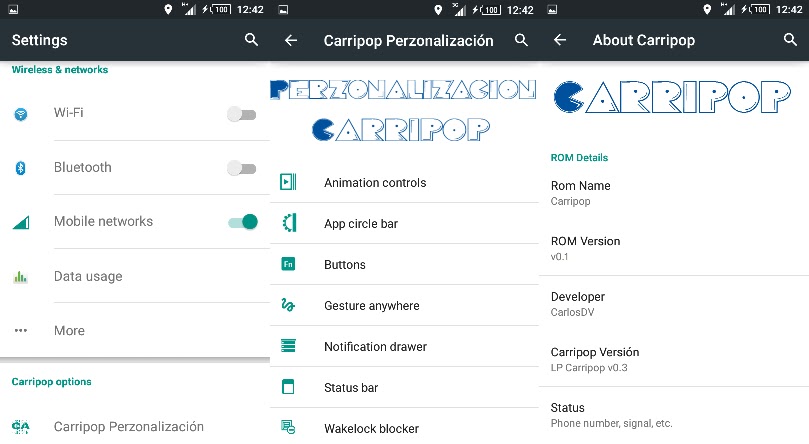
Carripop ROM. A developer must have heard about this ROM. It is very good ROM and now available for Motorola Moto E 2015 3G too.


This ROM is known for its battery capacity. It is said that this ROM saves so much battery. It's performance is very nice and have many new features like Carripop Personalization.


Installation and Review Video :


This ROM is based on CyanogenMod CM 12.1 and it is only for the 3G variant. It is Lollipop based ROM. 


Screenshots :


Installation Process :-

Step 1 - Download the ROM and GApps from the link below and put them in your phone or SD card.

Step 2 - Switch off your phone and press Power button + Volume Down  + Volume Up button together. Now Fastboot window will open.

Step 3 - Go to recovery using Volume Down button in fastboot mode and confirm by pressing Volume Up button.

Step 4 - Now take backup of your data by click on Backup button.

Step 5 - Now click on Wipe button and swipe to confirm wiping your data, cache and dalvik cache.

Step 6 - After wiping data, click on Install button, select the ROM and swipe to confirm flashing the ROM.

Step 7 - Now click on Reboot System to reboot your system in your new ROM.


Downloads :

Carripop ROM -- Download Here.
GApps -- Download Here.

Sunday, November 5, 2017

CrDroid ROM for Motorola Moto E 2015 3G|stock rom go to rompure.com

Motorola Moto E 2015 3G is getting new ROMs everyday. One of them is the CrDroid ROM. CrDroid ROM is very fast and its performance is incredible. This is only for the 3G model.


This ROM is ported by Krizthian and it is not for 4G/LTE model. Is is a ROM which is based on CyanogenMod CM 12.1 .  

Installation Video : 


Screenshots : 


Installation Process :- 


Step 1 - Download the ROM and GApps from the link below and put them in your phone or SD card.

Step 2 - Switch off your phone and press Power button + Volume Down  + Volume Up button together. Now Fastboot window will open.

Step 3 - Go to recovery using Volume Down button in fastboot mode and confirm by pressing Volume Up button.

Step 4 - Now take backup of your data by click on Backup button.

Step 5 - Now click on Wipe button and swipe to confirm wiping your data, cache and dalvik cache.

Step 6 - After wiping data, click on Install button, select the ROM and swipe to confirm flashing the ROM.

Step 7 - Now click on Reboot System to reboot your system in your new ROM.

Downloads : 

CrDroid ROM -- Download Here.
GApps -- Download Here.

Wednesday, November 1, 2017

Leaked images of Next-Gen Motorola Moto 360 with two different sizes |stock rom go to rompure.com

After the success of the first Moto 360, the world was waiting for its successor. It looks like Motorola is not good at keeping secrets as the next-gen Moto 360 images are looked. There were clues about specification of the new and hopefully improved version of the Moto 360.


The leaked images are posted by @evleaks and they shows two variants of the smart watches - one with smaller dialler. As previously told, the larger model might be called Moto 360L and the smaller one Moto 360S.

It is expected that 360L will be having 375 mAh of battery and 360S with 270 mAh battery. expected display resolution for both the watches is 360 x 360 pixels.


The new smartwatch has some slight design change. The crown button has been moved to 2 O’Clock position.

Rumours says that the next-gen smartwatch will be announced at IFA 2015 in Berlin next week, and will be launched by the end of the year.